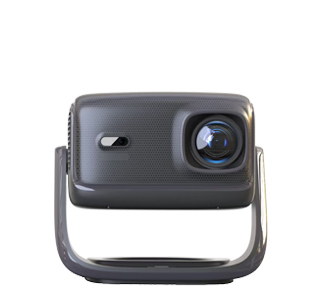
Wireless screen mirroring projectors (also called wireless projectors) are projection devices that support wireless connectivity—allowing users to stream content (videos, presentations, photos) from smartphones, tablets, laptops, or smart TVs to the projector without using physical cables (e.g., HDMI, USB). Unlike wired projectors (which require direct cable connections), wireless models leverage technologies like Wi-Fi (802.11ac/ax), Bluetooth, Miracast, AirPlay (Apple), or Chromecast (Google) to transmit content—making them ideal for environments where cable management is difficult (e.g., large conference rooms, classrooms with multiple users) or where portability is key (e.g., outdoor movie nights, mobile presentations). These projectors simplify content sharing, enabling multiple users to switch between devices quickly without disconnecting cables.
Core characteristics of wireless screen mirroring projectors include:
Diverse wireless technologies: To support different devices and platforms, these projectors integrate multiple wireless protocols:
Wi-Fi Direct/Miracast: For Android devices, Windows laptops, or Windows phones—enables direct screen mirroring without a Wi-Fi network (ideal for ad-hoc setups like classroom presentations).
AirPlay: Exclusive to Apple devices (iPhones, iPads, Macs)—allows streaming content or mirroring the screen with a single tap, with support for 4K video and audio.
Chromecast Built-in: For Android, iOS, or Windows devices—users cast content from apps (Netflix, YouTube, Google Slides) to the projector, with the projector handling playback (reducing device battery usage).
Bluetooth: Used for audio streaming (connecting wireless speakers or headphones) or as a secondary connection for device pairing.
Wi-Fi 6 (802.11ax): High-end models include Wi-Fi 6 for faster transmission speeds (up to 9.6 Gbps), lower latency (<20ms), and support for multiple devices (up to 100 concurrent connections)—critical for busy conference rooms or classrooms.
Ease of use: Wireless projectors prioritize user-friendly setup—many include a “one-touch mirroring” button (on the remote or projector body) that launches the wireless connection. Some models have a dedicated app (e.g., Epson iProjection, BenQ Smart Control) that guides users through pairing, allows remote control of the projector, and enables content sharing from cloud storage (Dropbox, Google Drive). For enterprise use, projectors support “room booking” integration (e.g., Microsoft Teams Rooms) — automatically connecting the presenter’s device when they enter the room.
Content compatibility: These projectors handle all types of wireless content—full HD/4K video (with HDR support on high-end models), interactive presentations (PowerPoint, Google Slides), live streams (Zoom, Teams), and even gaming (with low-latency modes to reduce lag). Some models support “split-screen mirroring”—displaying content from two devices at once (e.g., a laptop presentation on one side and a smartphone video on the other).
Security and reliability: To prevent unauthorized access, wireless projectors include security features like WPA3 encryption (for Wi-Fi), device authentication (only approved devices can connect), and “guest mode” (temporary access for visitors without full network permissions). For reliable transmission, they use technologies like beamforming (focusing Wi-Fi signals on the connected device) and error correction (fixing data glitches mid-stream)—ensuring no dropped frames or audio cuts.
Key applications of wireless screen mirroring projectors:
Classrooms: Teachers can mirror lessons from their tablets or laptops, while students can share group projects wirelessly—reducing time spent connecting cables and increasing engagement.
Conference rooms: Presenters can connect their devices in seconds, switch between speakers without cable changes, and even stream content from remote participants (via Zoom or Teams).
Home use: Families can mirror movies from their phones to the projector for outdoor nights, or stream games from a console (via Chromecast) to a large screen.
Retail and hospitality: Stores can wirelessly update advertising content on projector displays, while hotels can let guests mirror their devices to in-room projectors for personalized entertainment.
When selecting a wireless projector, consider factors like wireless range (most cover 30-50 feet), number of supported devices, and compatibility with your existing devices (e.g., Apple users may prioritize AirPlay, while Android users may prefer Chromecast). With their convenience and flexibility, wireless screen mirroring projectors have become the standard for modern projection setups, eliminating the hassle of cables while delivering high-quality content.
Read recommendations:
HW40 Home Cinema - HW Series Projector
How to Identify Fake Lumen Markings on Projectors to Avoid Being Scammed
Eye - Protection Mode of Projectors












 Reviewed: