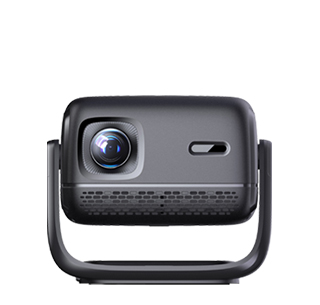
Projectors can be perfectly connected to network TV boxes, and this matching combination is one of the most practical solutions for home projection viewing. Many household projectors, especially entry-level and mid-range models, have limited built-in system resources, with insufficient built-in video resources, slow system operation, and poor 4K decoding capability. Network TV boxes can make up for these shortcomings, upgrading the projector’s intelligent playback performance, enriching video resources, and realizing smoother high-definition playback. Whether it is a new smart projector or an old traditional projector without an intelligent system, it can be successfully connected to a TV box through mainstream interface protocols.
The most common and stable connection method is wired HDMI connection, which is compatible with almost all projectors and TV boxes. Almost all modern network boxes are equipped with standard HDMI output ports, and projectors of all models retain HDMI input interfaces. Users only need to connect one end of an HDMI cable to the TV box’s HDMI output port and the other end to the projector’s HDMI input port, then switch the projector’s signal source to the corresponding HDMI channel to complete the connection. This wired connection supports stable transmission of 4K ultra-high-definition images and lossless multi-channel audio signals, with no frame drop, delay, or screen flickering, ensuring synchronized picture and sound for movies, live TV, and variety shows.
For old projectors without HDMI interfaces, users can use adapter cables such as HDMI to VGA or HDMI to AV to realize compatible connection. Although this conversion method cannot transmit high-definition audio and video signals like pure HDMI connection, it can basically meet daily 1080P viewing needs. In addition to wired connection, some smart projectors and new TV boxes support wireless screen projection and wireless connection functions. By connecting the projector and TV box to the same home WiFi network, users can achieve wireless signal transmission, eliminating cable wiring troubles and making bedroom placement neater and more beautiful.
Connecting a TV box to a projector brings many practical advantages. TV boxes have powerful decoding chips, which can smoothly play 4K HDR ultra-high-definition resources that projectors cannot decode independently. They also support massive third-party video applications, live TV broadcasts, and local video playback, greatly expanding the projector’s usage scenarios. Moreover, the independent system of the TV box runs more smoothly than the projector’s built-in system, avoiding stuttering and crashes during long-term use. For bedroom projection users who pursue rich resources and stable playback, matching a projector with a network TV box is a cost-effective and highly practical choice.
Read recommendations:
HW40 Home Cinema - HW Series Projector
comparing Projector and TV
Usage Method of Projector Wireless Screen Mirroring Device














 Reviewed: